> ## Documentation Index
> Fetch the complete documentation index at: https://reportana.dev/llms.txt
> Use this file to discover all available pages before exploring further.
# findOrdersByEmail
## Introduction
The `findOrdersByEmail` function allows you to locate orders associated with a customer by using the provided email address. When executed within the **Execute JavaScript** block, it checks for the existence of orders in the system and, if found, returns an array containing detailed information about the orders linked to that email — including customer details, purchased items, and payment status.
## How to Use
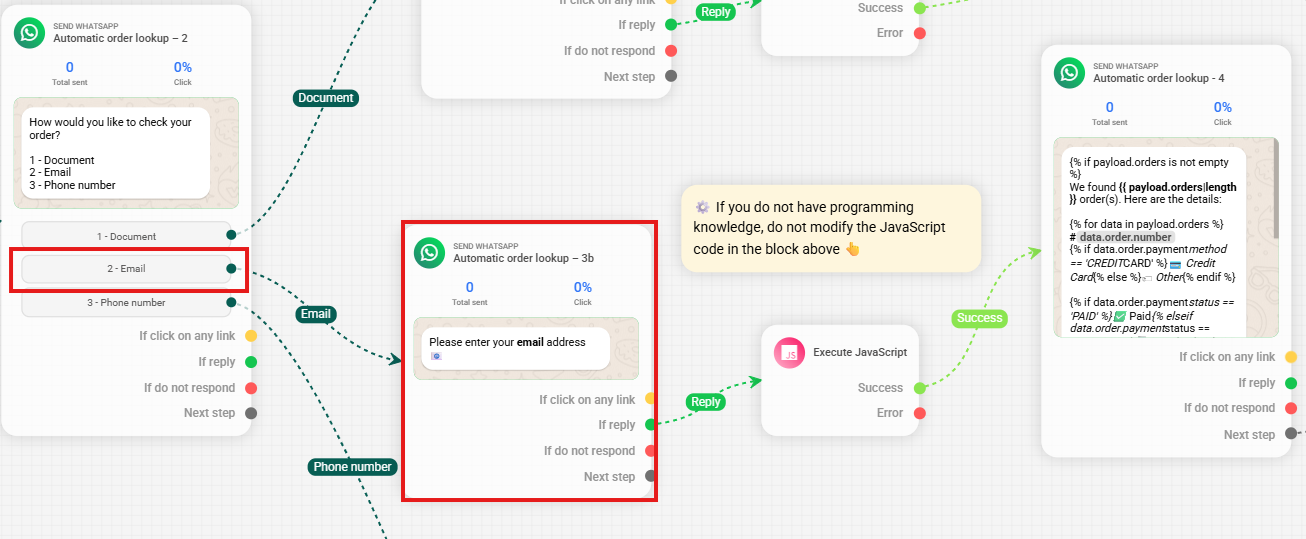
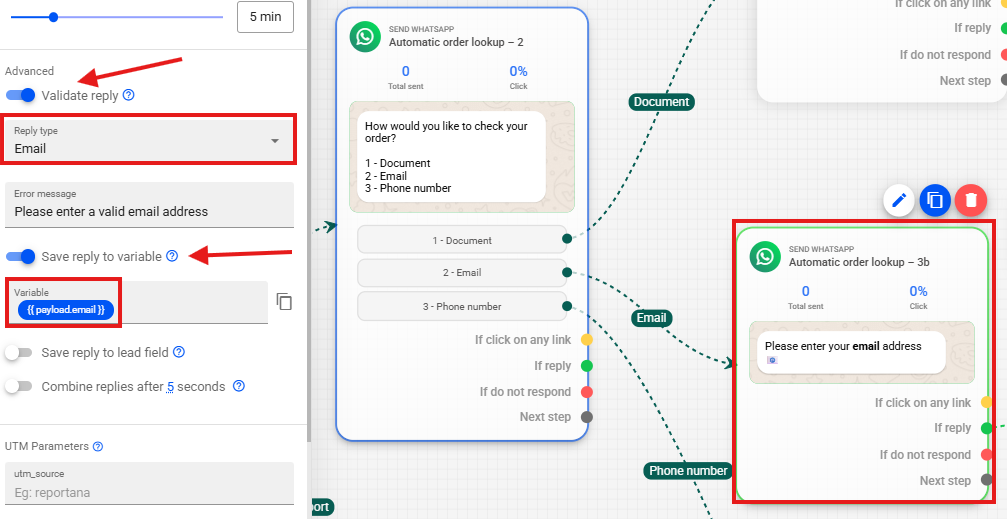
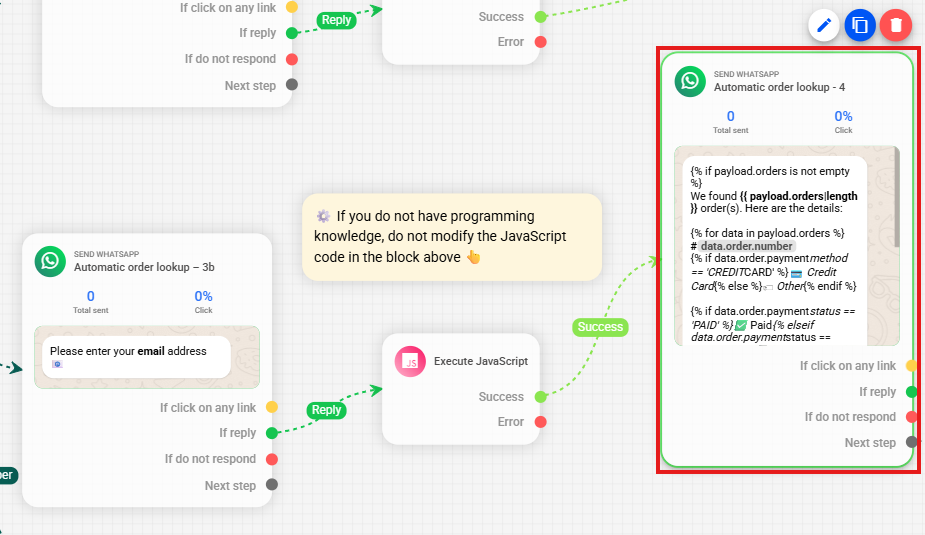
1. First, you will need to use the advanced settings of our WhatsApp messages to request the client's email, saving the response provided by the client in a variable — in this case, `payload.email`.
 **Note:** To learn more about the advanced settings of our WhatsApp messages, visit our Help Center article: [Understanding Logic, Time, Chat, and Advanced Automation Actions ➾ Advanced Actions](https://reportana.com/help/article/understanding-logic-time-chat-and-advanced-actions-automations)
Next, once the client provides their email, use the **Execute JavaScript** block in your automation flow to run the `findOrdersByEmail` function and search for orders associated with the provided email address.
**Note:** To learn more about the advanced settings of our WhatsApp messages, visit our Help Center article: [Understanding Logic, Time, Chat, and Advanced Automation Actions ➾ Advanced Actions](https://reportana.com/help/article/understanding-logic-time-chat-and-advanced-actions-automations)
Next, once the client provides their email, use the **Execute JavaScript** block in your automation flow to run the `findOrdersByEmail` function and search for orders associated with the provided email address.
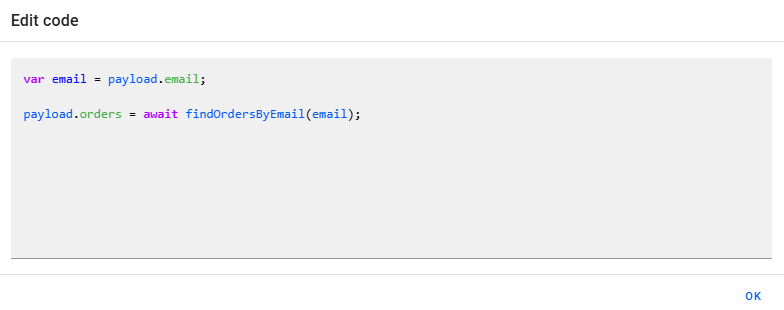
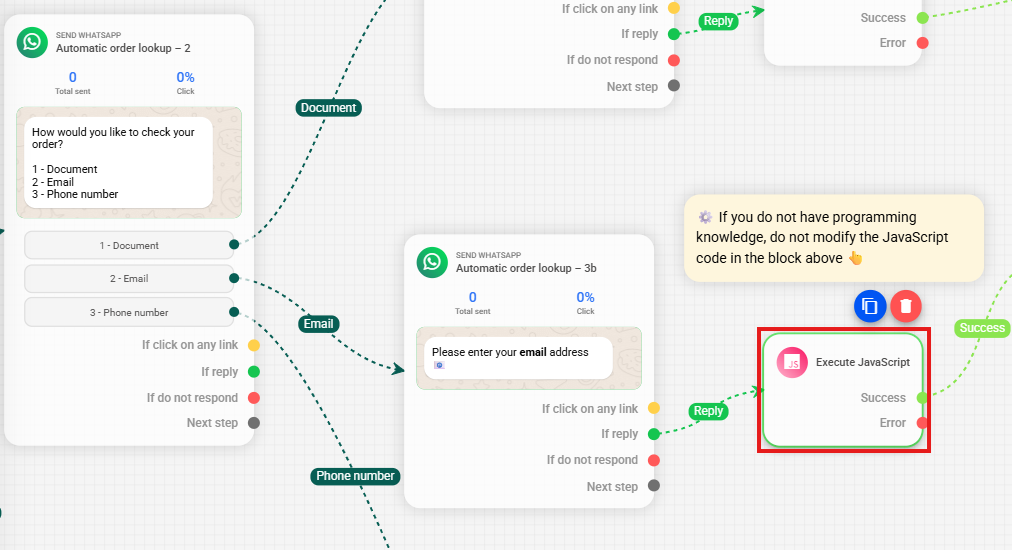 3. In the **Execute JavaScript** block, we use the code `payload.orders = await findOrdersByEmail(payload.email)` to retrieve orders associated with the email provided by the client. This way, the email saved in the `payload.email` variable is used by the `findOrdersByEmail` function to query the system, and the result is stored in `payload.orders` as an array containing the orders.
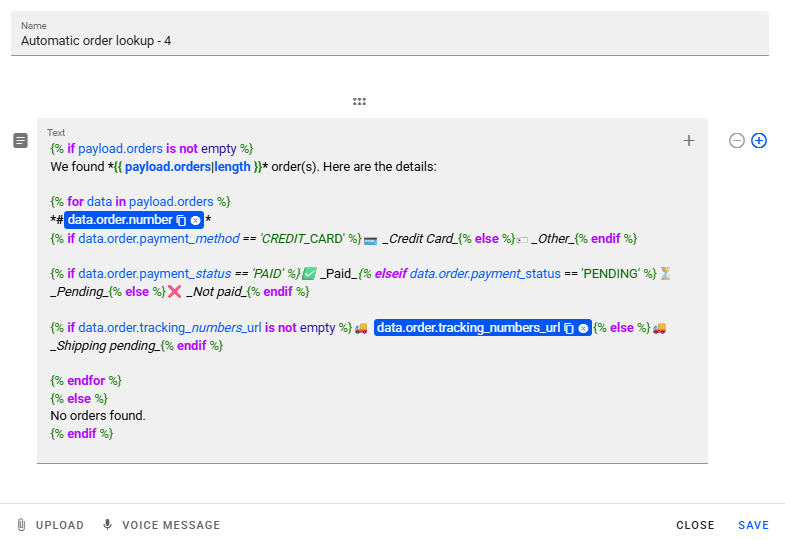
 4. The search response can subsequently return information about the orders found in the following messages.
 ```twig theme={null}
{% if payload.orders is not empty %}
We found *{{ payload.orders|length }}* order(s). Here are the details:
{% for data in payload.orders %}
*#{{ data.order.number }}*
{% if data.order.payment_method == 'BOLETO' %}🏷 _Boleto_{% elseif data.order.payment_method == 'CREDIT_CARD' %}💳 _Credit Card_{% elseif data.order.payment_method == 'PIX' %}🤳🏼 _Pix_{% else %}🏷 _Other_{% endif %}
{% if data.order.payment_status == 'PAID' %}✅ _Paid_{% elseif data.order.payment_status == 'PENDING' %}⏳ _Pending_{% else %}❌ _Unpaid_{% endif %}
{% if data.order.tracking_numbers_url is not empty %}🚚 {{ data.order.tracking_numbers_url }}{% else %}🚚 _Shipping pending_{% endif %}
{% endfor %}
{% else %}
No orders found.
{% endif %}
```
**Note:** In the example code, if no orders are found associated with the provided email, the message *"No orders found."* will be displayed.
To structure the response message containing the order data in this example, we use the **Reportana® Script** templating language, which supports `for` and `if/else` structures. These commands enable detailed and conditional formatting of the displayed information. To deepen your knowledge about **Reportana® Script** and explore more examples, please consult the complete documentation: [Reportana® Script - Documentation](https://reportana.dev/en/reportana-script-en).
## Return of the `findOrdersByEmail` Function
```twig theme={null}
{
"orders": [
{
"reference_id": 1234,
"reference_type": "ORDER",
"customer_id": 1234,
"name": "John Smith",
"first_name": "John",
"last_name": "Smith",
"email": "john.smith@example.com",
"phone": "+1 555-123-4567",
"shop": {
"id": 1234,
"name": "Test Store",
"currency_code": "USD",
"billing_address_formatted": "123 Maple Street, Downtown, Springfield, IL, 62704, USA"
},
"customer": {
"id": 104657184,
"name": "John Smith",
"email": "john.smith@example.com",
"phone": "+1 555-123-4567",
"birth_date": null,
"metadata": []
},
"order": {
"admin_url": "https://….png",
"customer_name": "John Smith",
"customer_email": "john.smith@example.com",
"customer_phone": "+1 555-123-4567",
"customer_document": "123-45-6789",
"billing_address": {
"name": "John Smith",
"first_name": "John",
"last_name": "Smith",
"company": null,
"phone": "+1 555-123-4567",
"address1": "456 Oak Avenue, Apt 31",
"address2": "Downtown",
"city": "Springfield",
"province": "Illinois",
"province_code": "IL",
"country": "United States",
"country_code": "US",
"zip": "62704",
"latitude": null,
"longitude": null
},
"shipping_address": {
"name": "John Smith",
"first_name": "John",
"last_name": "Smith",
"company": null,
"phone": "+1 555-123-4567",
"address1": "456 Oak Avenue, Apt 31",
"address2": "Downtown",
"city": "Springfield",
"province": "Illinois",
"province_code": "IL",
"country": "United States",
"country_code": "US",
"zip": "62704",
"latitude": null,
"longitude": null
},
"number": "1234",
"currency": "USD",
"total_price": "99.90",
"total_price_formatted": "$99.90",
"subtotal_price": "0.00",
"subtotal_price_formatted": "$0.00",
"line_items": [
{
"title": "My Robot",
"variant_title": "Blue",
"quantity": 1,
"price": 210.27,
"path": "https://….png",
"image_url": "https://….png",
"tracking_number": null
}
],
"payment_status": "PAID",
"payment_method": "BOLETO",
"billet_url": "https://boleto.pl/1234abcd",
"billet_line": "00000000000000000000000000000000000000000000000",
"billet_expired_at": "2024-04-30 00:00:00",
"billet_expired_at_formatted": "04/30/2024",
"original_created_at": "2024-04-27 08:30:06",
"billing_address_formatted": "456 Oak Avenue, Apt 31, Downtown, Springfield, IL, 62704",
"shipping_address_formatted": "456 Oak Avenue, Apt 31, Downtown, Springfield, IL, 62704",
"line_items_formatted": "My Robot",
"line_items_formatted_with_variant": "My Robot - Blue",
"tracking_numbers_formatted": "1234ABCD",
"tracking_numbers_url": "https://boleto.pl/1234ABCD",
"tracking_numbers": [
{
"code": "NL0000000000US",
"new_code": "NL0000000123US",
"full_status": "DELIVERED",
"elapsed_time": 30,
"tax_at": "2024-11-30 11:46:45",
"delivered_at": "2024-12-14 11:46:45",
"returning_to_sender_at": "2024-11-30 11:46:45",
"returned_to_sender_at": "2024-11-30 11:46:45",
"first_update_at": "2024-11-14 11:46:45",
"last_update_at": "2024-12-14 11:46:45",
"last_request_at": "2024-12-14 11:46:45",
"events": [
{
"type": "COURIER",
"date": "2024-12-14 11:46:45",
"label": "Delivered",
"location": "Springfield, IL",
"description": "Your package has been delivered"
},
{
"type": "COURIER",
"date": "2024-11-14 11:46:45",
"label": "Shipped",
"location": "Springfield, IL",
"description": "Accepted by the courier"
}
]
}
]
}
}
]
}
```
## Data Returned in the Response
The search returns detailed information about the orders, including:
* **Customer Data:** Name, phone, email used to place the order, etc;
* **Order Information:** Order ID, payment status (e.g., paid, pending), payment method (e.g., boleto, credit card), order creation date, etc;
* **Address Data:** Billing address and shipping address, including city, state, ZIP code, etc;
* **Order Items:** Product name, variant (e.g., color), quantity, unit price, product image link, etc;
* **Payment Information:** Boleto URL, boleto barcode line, due date, Pix copy and paste code, total order value, etc;
* **Useful URLs:** Order tracking link and any other relevant URLs.
These data allow composing personalized messages to inform the customer about the details of orders associated with the email provided in the search.
```twig theme={null}
{% if payload.orders is not empty %}
We found *{{ payload.orders|length }}* order(s). Here are the details:
{% for data in payload.orders %}
*#{{ data.order.number }}*
{% if data.order.payment_method == 'BOLETO' %}🏷 _Boleto_{% elseif data.order.payment_method == 'CREDIT_CARD' %}💳 _Credit Card_{% elseif data.order.payment_method == 'PIX' %}🤳🏼 _Pix_{% else %}🏷 _Other_{% endif %}
{% if data.order.payment_status == 'PAID' %}✅ _Paid_{% elseif data.order.payment_status == 'PENDING' %}⏳ _Pending_{% else %}❌ _Unpaid_{% endif %}
{% if data.order.tracking_numbers_url is not empty %}🚚 {{ data.order.tracking_numbers_url }}{% else %}🚚 _Shipping pending_{% endif %}
{% endfor %}
{% else %}
No orders found.
{% endif %}
```
**Note:** In the example code, if no orders are found associated with the provided email, the message *"No orders found."* will be displayed.
To structure the response message containing the order data in this example, we use the **Reportana® Script** templating language, which supports `for` and `if/else` structures. These commands enable detailed and conditional formatting of the displayed information. To deepen your knowledge about **Reportana® Script** and explore more examples, please consult the complete documentation: [Reportana® Script - Documentation](https://reportana.dev/en/reportana-script-en).
## Return of the `findOrdersByEmail` Function
```twig theme={null}
{
"orders": [
{
"reference_id": 1234,
"reference_type": "ORDER",
"customer_id": 1234,
"name": "John Smith",
"first_name": "John",
"last_name": "Smith",
"email": "john.smith@example.com",
"phone": "+1 555-123-4567",
"shop": {
"id": 1234,
"name": "Test Store",
"currency_code": "USD",
"billing_address_formatted": "123 Maple Street, Downtown, Springfield, IL, 62704, USA"
},
"customer": {
"id": 104657184,
"name": "John Smith",
"email": "john.smith@example.com",
"phone": "+1 555-123-4567",
"birth_date": null,
"metadata": []
},
"order": {
"admin_url": "https://….png",
"customer_name": "John Smith",
"customer_email": "john.smith@example.com",
"customer_phone": "+1 555-123-4567",
"customer_document": "123-45-6789",
"billing_address": {
"name": "John Smith",
"first_name": "John",
"last_name": "Smith",
"company": null,
"phone": "+1 555-123-4567",
"address1": "456 Oak Avenue, Apt 31",
"address2": "Downtown",
"city": "Springfield",
"province": "Illinois",
"province_code": "IL",
"country": "United States",
"country_code": "US",
"zip": "62704",
"latitude": null,
"longitude": null
},
"shipping_address": {
"name": "John Smith",
"first_name": "John",
"last_name": "Smith",
"company": null,
"phone": "+1 555-123-4567",
"address1": "456 Oak Avenue, Apt 31",
"address2": "Downtown",
"city": "Springfield",
"province": "Illinois",
"province_code": "IL",
"country": "United States",
"country_code": "US",
"zip": "62704",
"latitude": null,
"longitude": null
},
"number": "1234",
"currency": "USD",
"total_price": "99.90",
"total_price_formatted": "$99.90",
"subtotal_price": "0.00",
"subtotal_price_formatted": "$0.00",
"line_items": [
{
"title": "My Robot",
"variant_title": "Blue",
"quantity": 1,
"price": 210.27,
"path": "https://….png",
"image_url": "https://….png",
"tracking_number": null
}
],
"payment_status": "PAID",
"payment_method": "BOLETO",
"billet_url": "https://boleto.pl/1234abcd",
"billet_line": "00000000000000000000000000000000000000000000000",
"billet_expired_at": "2024-04-30 00:00:00",
"billet_expired_at_formatted": "04/30/2024",
"original_created_at": "2024-04-27 08:30:06",
"billing_address_formatted": "456 Oak Avenue, Apt 31, Downtown, Springfield, IL, 62704",
"shipping_address_formatted": "456 Oak Avenue, Apt 31, Downtown, Springfield, IL, 62704",
"line_items_formatted": "My Robot",
"line_items_formatted_with_variant": "My Robot - Blue",
"tracking_numbers_formatted": "1234ABCD",
"tracking_numbers_url": "https://boleto.pl/1234ABCD",
"tracking_numbers": [
{
"code": "NL0000000000US",
"new_code": "NL0000000123US",
"full_status": "DELIVERED",
"elapsed_time": 30,
"tax_at": "2024-11-30 11:46:45",
"delivered_at": "2024-12-14 11:46:45",
"returning_to_sender_at": "2024-11-30 11:46:45",
"returned_to_sender_at": "2024-11-30 11:46:45",
"first_update_at": "2024-11-14 11:46:45",
"last_update_at": "2024-12-14 11:46:45",
"last_request_at": "2024-12-14 11:46:45",
"events": [
{
"type": "COURIER",
"date": "2024-12-14 11:46:45",
"label": "Delivered",
"location": "Springfield, IL",
"description": "Your package has been delivered"
},
{
"type": "COURIER",
"date": "2024-11-14 11:46:45",
"label": "Shipped",
"location": "Springfield, IL",
"description": "Accepted by the courier"
}
]
}
]
}
}
]
}
```
## Data Returned in the Response
The search returns detailed information about the orders, including:
* **Customer Data:** Name, phone, email used to place the order, etc;
* **Order Information:** Order ID, payment status (e.g., paid, pending), payment method (e.g., boleto, credit card), order creation date, etc;
* **Address Data:** Billing address and shipping address, including city, state, ZIP code, etc;
* **Order Items:** Product name, variant (e.g., color), quantity, unit price, product image link, etc;
* **Payment Information:** Boleto URL, boleto barcode line, due date, Pix copy and paste code, total order value, etc;
* **Useful URLs:** Order tracking link and any other relevant URLs.
These data allow composing personalized messages to inform the customer about the details of orders associated with the email provided in the search.